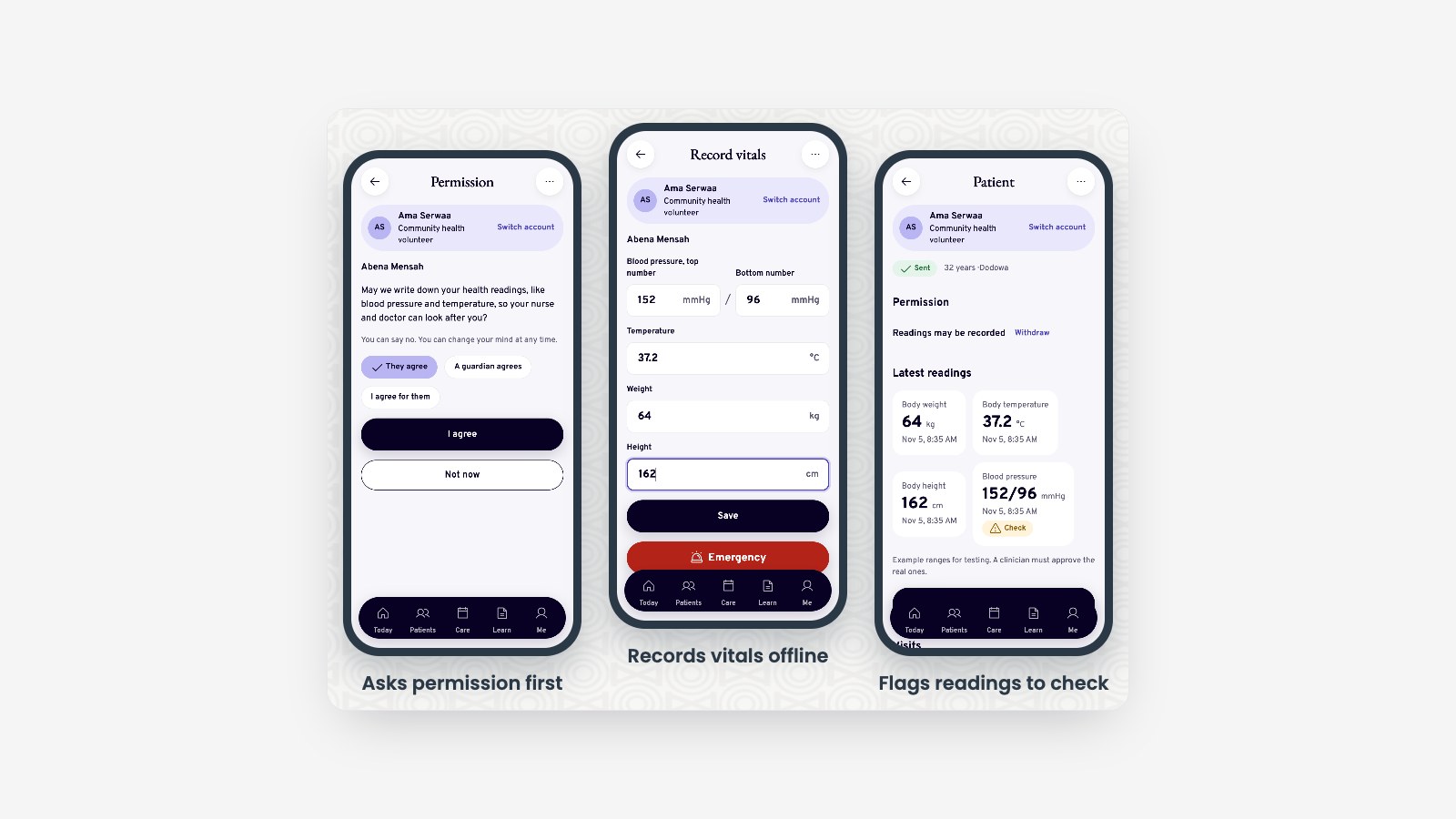
Agricultural extension agents in Ghana spend their days in places where the phone signal comes and goes. If a registration app needs the network to save a farmer's details, the agent either waits or gives up. Paper fills the gap, and the data never reaches anyone who could use it.
AgroConnect Ghana was our answer for the first project in my Cloud Computing course at Ashesi: an offline-first app that lets agents register farmers, take photos and record GPS positions with no signal, then syncs when the network comes back. Farmers, agents, coordinators and admins each have their own view, and farmers on basic phones can use USSD.
I was the team's Cloud and DevOps lead. This article is about that half: where the system runs, how it gets there, and what it costs.
The team
| Member | Role |
|---|---|
| Joseph Etse | Project manager, overall architecture and coordination |
| Eugene Sewor (me) | Cloud and DevOps lead: Terraform, AWS, CI/CD |
| Elise Kennedy-Angbo | Data lead: backend service, database schema and migrations |
| Perfect Avugla | Frontend lead: the offline-first app, mobile UI and sync |
Outside my lane, I also hardened the API: per-IP rate limiting, scoping farmer records to the person asking, session revocation, unit tests and a backup-and-restore check.
Start with a measurement, not a guess
The usual reflex is to deploy to us-east-1 or the nearest European region. We tested instead, timing connections from Ghana to candidate regions on three providers:
| Provider | Region | Median request round trip |
|---|---|---|
| AWS | af-south-1 (Cape Town) |
74 ms |
| AWS | eu-south-2 (Spain) |
112 ms |
| AWS | eu-west-2 (London) |
117 ms |
| Azure | South Africa North (Johannesburg) | 129 ms |
| GCP | europe-west9 (Paris) |
127 ms |
| AWS | us-east-1 (N. Virginia) |
175 ms |
Cape Town won clearly, so the API, database and storage all run in af-south-1. Users on slow rural connections feel every extra round trip, and 100 ms saved per request adds up fast when a sync sends dozens of them.
From sketch to system
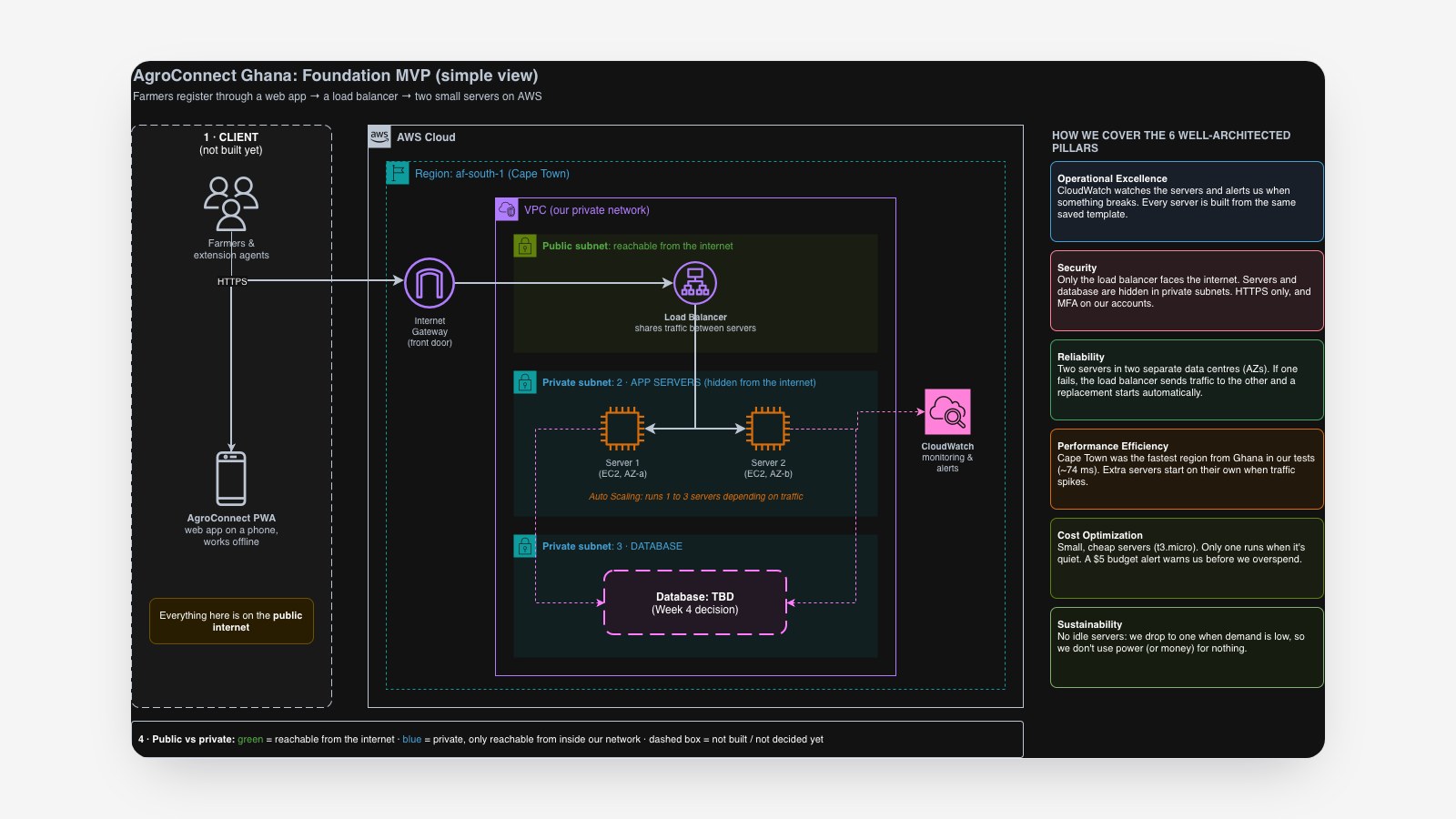
Our first architecture was deliberately simple: a load balancer, two small servers in two availability zones, and a database we hadn't chosen yet.
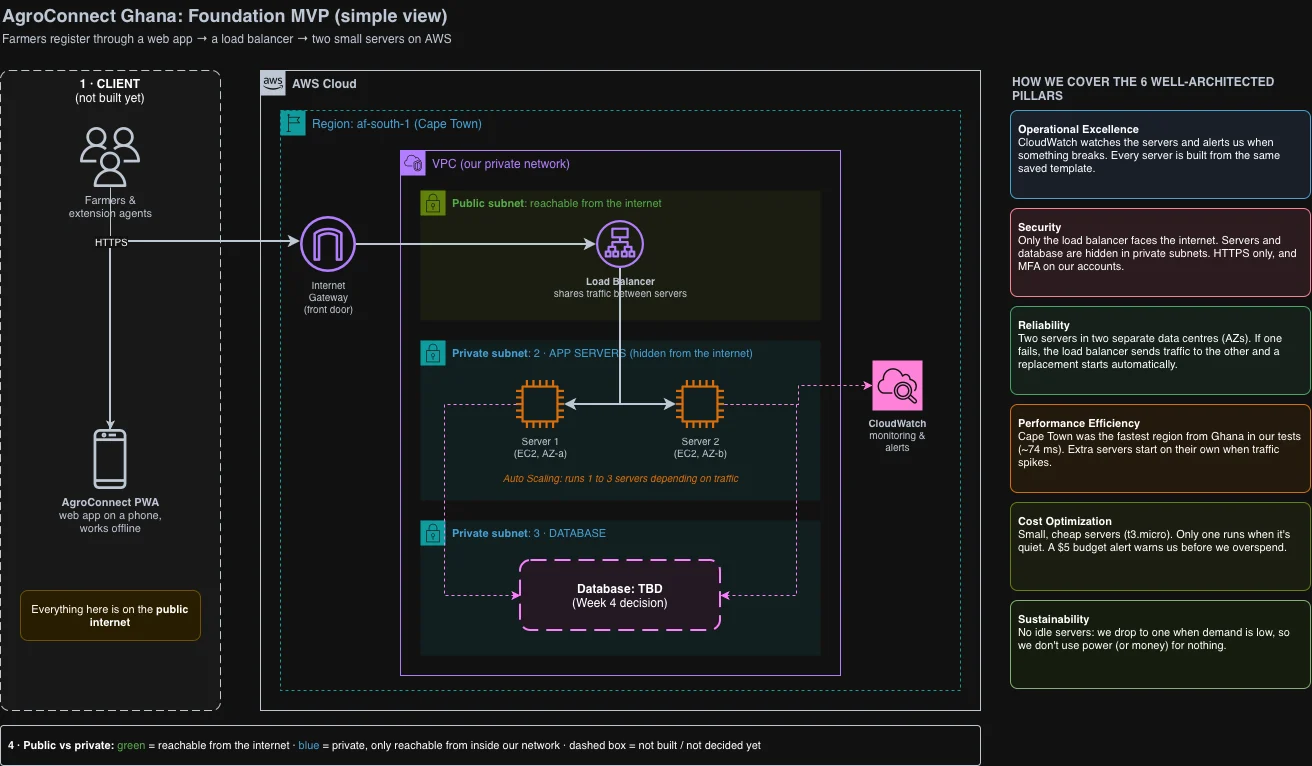
By the end of the project it had grown into this:
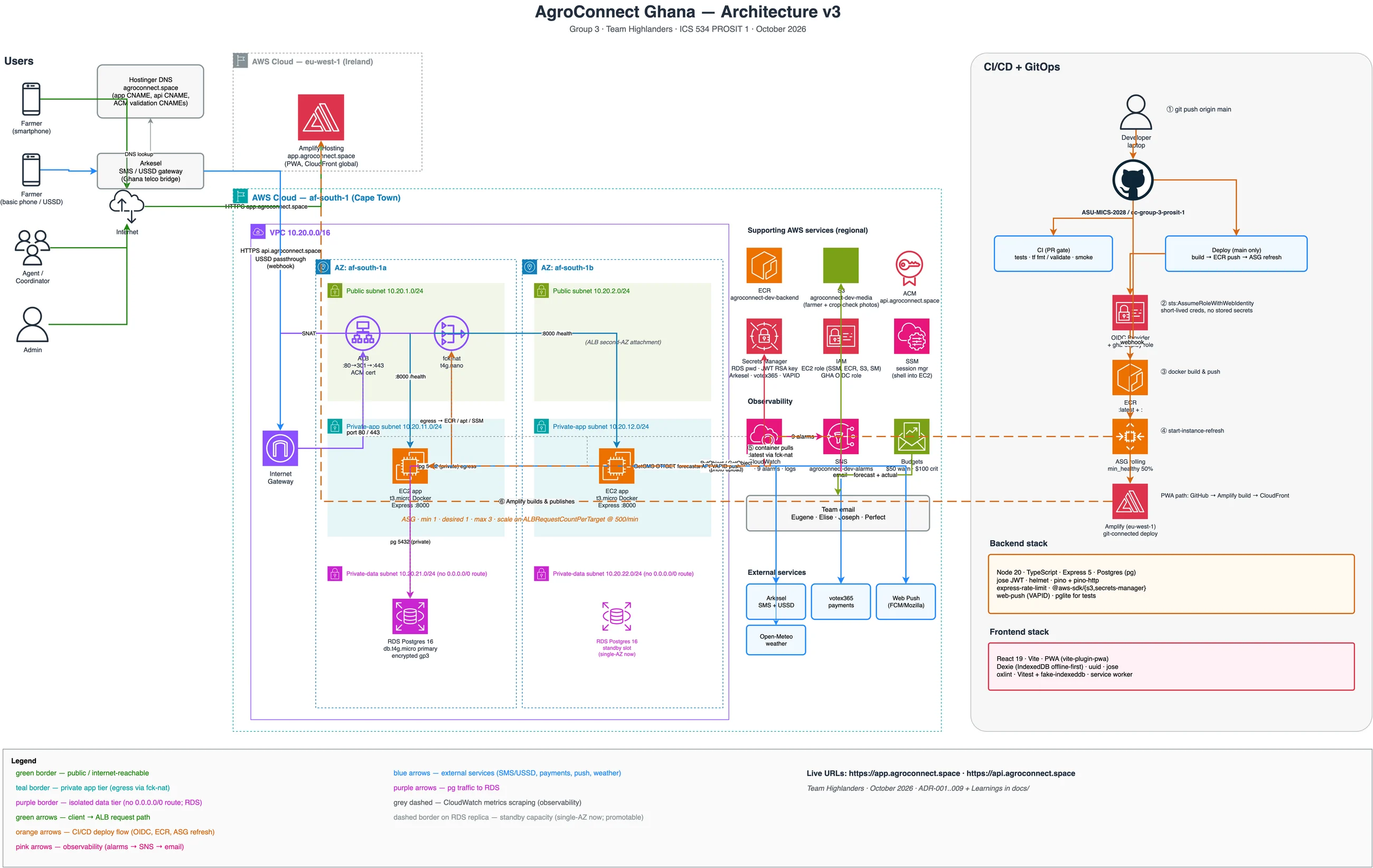
The shape is a classic three-tier network, but each choice had a reason:
- Three layers of subnets in a
10.20.0.0/16network. Public subnets hold only the load balancer and the NAT instance. The app servers sit in private subnets with no public IP. The database sits in isolated subnets with no route to the internet at all. - Two availability zones for the load balancer and app servers, so one data centre failing doesn't take the API down. The database is single-zone for the lab, with a standby slot drawn in.
- No SSH, anywhere. Port 22 is closed. Servers are reached through AWS Systems Manager, which needs only an IAM role.
- Secrets by reference. Database passwords and SMS-provider keys live in Secrets Manager. Servers read them at start-up through their IAM role, so they're never baked into a machine image or a config file.
Everything as Terraform
All of it is defined in Terraform, split into 11 modules: network, NAT, load balancer, compute, container registry, database, storage, secrets, observability, CI/CD and frontend. I started with one large main.tf and broke it up once it became hard to review; each module now has one job and can be read on its own.
Terraform's state, the record of what exists, lives in an S3 bucket using Terraform 1.10's built-in locking. That removed the DynamoDB lock table older setups need, and with it one more thing to create, pay for and explain.
Cutting the NAT bill by 90%
Private servers still need to reach out: to pull container images, install patches and call the SMS provider. AWS's managed NAT Gateway costs about $32 a month per zone before data charges, more than our budget allowed.
Instead I ran fck-nat, an open-source NAT image, on an ARM t4g.nano instance for about $3 a month. The trade-off is written down: one NAT instance in one zone is a single point of failure for outbound traffic. For a course project on a tight budget, that's the right call; for production, it becomes an Auto Scaling group of NAT instances across zones.
Scaling on the right signal
The first scaling policy, made in the console, scaled on CPU at 60%. For an API that mostly waits on the database and the network, CPU is a poor signal: a server can be saturated with slow requests while its CPU sits near idle.
I replaced it with target tracking on requests per server, at 500 requests per minute per instance, scaling between one and three t3.micro servers. A quiet day costs one instance, about $10 a month; the ceiling is three.
Deploying without stored keys
The pipeline runs on GitHub Actions:
- Every pull request builds the TypeScript API, boots it and checks its
/healthendpoint, and runsterraform fmtandvalidateacross all 11 modules. - A merge to
mainbuilds the Docker image, tags it with the commit SHA, pushes it to Amazon ECR, and starts a rolling instance refresh: new servers launch and pass health checks before old ones are terminated, so the API never drops below full capacity. - A smoke test hits the live API after each deploy.
GitHub never holds an AWS access key. The workflow proves who it is with OIDC, a short-lived signed token, and AWS lets it take a role that trusts only this repository's main branch. A leaked repository secret can't be an AWS key, because there isn't one.
Rollbacks are a parameter change. The image tag the servers run is pinned in Systems Manager Parameter Store, so going back to a previous release means setting the old SHA and refreshing, not rebuilding anything.
Watching it and paying for it
The observability module creates a CloudWatch dashboard, alarms on the load balancer, Auto Scaling group, database and servers, and an SNS topic that emails the team when something trips. Server logs stream straight from Docker into CloudWatch Logs.
There's also an AWS Budget of $100 a month, scoped to resources tagged for this project so it ignores everything else in the shared account. It warns at 50% of forecast spend and alerts at 100% of actual spend.
Two things AWS doesn't tell you
We kept an engineering journal of everything that surprised us. Two entries were mine and are worth sharing.
Amplify can't be fully created by Terraform
The app is static files, so I hosted it on AWS Amplify. The first surprise: Amplify Hosting isn't offered in af-south-1 at all, so the frontend lives in eu-west-1 (Ireland) behind CloudFront's global edges, while everything else stays in Cape Town.
The second was stranger. Our GitHub organisation blocks deploy keys, so Amplify had to connect through its GitHub App. Terraform kept failing with "You should at least provide one valid token". The reason: the public Amplify API that Terraform uses only accepts tokens. The console's "Connect to GitHub" button uses a private API that AWS has never exposed. The fix was to create the app once in the console, then terraform import it, after which Terraform manages it normally.
The lesson: "infrastructure as code" sometimes needs one honest manual step, documented, rather than a fight with a missing API.
CloudFront routes by name, not by address
A teammate opened the raw CloudFront address our app's domain points to and got a 404, and reasonably worried the DNS was wrong. It wasn't. CloudFront decides which site to serve from the HTTP Host header, not from the IP the request arrived at. The raw *.cloudfront.net name isn't on the distribution's list of domains, so it gets a 404; app.agroconnect.space is, so it works.
The lesson: DNS gets a request to the right building; the Host header decides which door it walks through.
How it lines up with the Well-Architected Framework
| Pillar | What we did |
|---|---|
| Operational excellence | All infrastructure in Terraform; immutable image deploys; one dashboard and alarms by email |
| Security | No public IPs on app or database servers; no SSH; OIDC instead of keys; secrets in Secrets Manager; MFA for every team member's AWS login |
| Reliability | Two zones; health-checked rolling deploys; automatic server replacement; database snapshots |
| Performance | Region chosen by measurement; the app cached at the edge; photos compressed under 100 KB before upload |
| Cost | fck-nat instead of NAT Gateway; one small server on quiet days; a project-scoped budget |
| Sustainability | ARM (Graviton) for NAT and the database; batch syncing instead of constant traffic |
What I took away
- Measure the region. A small latency test changed where everything runs.
- Pick the scaling signal for the workload. CPU is the default, not the answer.
- Keys you don't store can't leak. OIDC removed a whole class of mistakes.
- Write the trade-offs down. The single NAT instance is a known risk with a known fix, which is very different from an unknown one.
- Expect one manual step. The Amplify import taught me where AWS's APIs end.
All 16 architecture decisions, the engineering journal and the Terraform are in the repository.